Pink Blossom Procreate Color Palette: A Designer's Springtime Toolkit
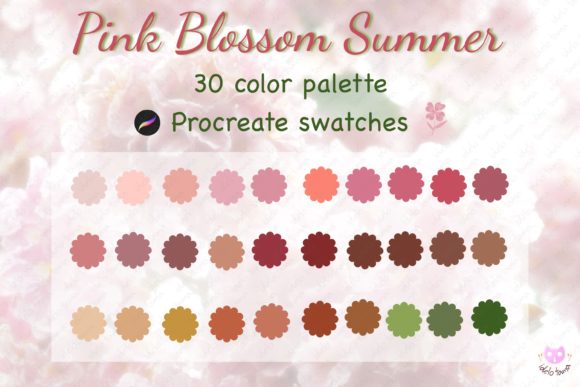
There’s a specific feeling that comes with the first blooms of spring—that soft, optimistic, and slightly romantic energy. The Pink Blossom Procreate Color Palette captures that exact moment and bottles it into a set of 30 carefully curated digital swatches. As a digital tool, it’s more than just a collection of colors; it’s a mood board ready for import, designed to bring a cohesive, fresh, and professional aesthetic to your work in the iPad Procreate app. Whether you're sketching initial concepts or finalizing a social media graphics campaign, this palette provides a ready-made foundation for projects that need a touch of warmth and elegance.
More Than Just Pink: Understanding the Palette's Nuance
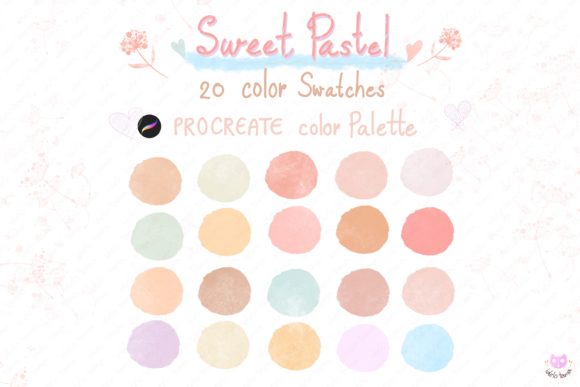
When you first open the Procreate color swatches file, you'll notice the range is sophisticated. It avoids flat, single-note pinks. Instead, you’ll find dusty roses, creamy blushes, warm terracotta hints, and deep berry accents that provide necessary contrast. This isn’t a palette for loud, aggressive designs. Its personality is calm, approachable, and confidently feminine without being childish. The style leans modern and clean, making it a versatile add-on color palette procreate tool for both minimalist and detailed illustration work. The visual appeal lies in its balance—light tones for backgrounds and negative space, mid-tones for primary elements, and richer shades for focal points and text.
Practical Applications: Where This Palette Shines
Knowing where to apply a digital color palette swatches set like this is key to its value. Its strength is in projects that benefit from a soft, human touch.
- Branding & Logo Design: For businesses in wellness, beauty, boutique retail, floristry, wedding planning, or artisanal food, the Pink Blossom palette can form the core of a brand identity. It communicates care, quality, and a personal touch. Use it for your primary logo, business cards, and brand style guides.
- Digital Content & Social Media: This is where the palette truly excels for content creators and marketers. Create Instagram carousels, Pinterest pins, and Facebook ads that feel consistently warm and inviting. The colors are highly engaging and stop-the-scroll effective without being jarring.
- Publishing & Editorial Design: Bloggers and publishers can use these swatches for blog post featured images, magazine layouts, or e-book covers. The palette ensures visual hierarchy is clear and the reading experience feels pleasant. Pair it with a clean sans serif font for body text and a delicate script font for headings to maximize its aesthetic.
- Product Packaging & Print Design: If you’re a small business owner designing product labels, thank-you cards, or promotional flyers, this palette translates beautifully to print. It gives physical products a shelf appeal that feels modern and premium.
- Personal Projects & Hobby Art: For crafters and hobbyists, it’s perfect for digital journaling, planner stickers, greeting card designs, or character illustration. The iPad swatches make it easy to maintain color consistency across a series of personal artworks.
Making the Palette Work for You: Practical Guidance
Adopting any new design asset requires a strategy. Here’s how to integrate the Pink Blossom Procreate Color Palette effectively into your workflow.
1. Evaluate Project Fit First. Before you import, ask: does the project's emotion align with this palette's personality? It’s ideal for themes of growth, care, romance, and softness. It may not be the right fit for corporate finance, heavy machinery, or high-energy sports branding. Always match the tool to the task.
2. Test Font Pairings Strategically. Color works in concert with typography. This palette pairs exceptionally well with certain typeface styles. For a modern, clean look, combine it with a geometric sans serif font. To enhance its romantic or elegant side, use a refined serif font or a flowing script font. Avoid overly bold or grunge-style fonts, as they can clash with the palette's delicate nature. When creating a logo design, ensure your color and font choices tell a coherent story.
3. Master the Included Styles. You receive 30 colors. Use them with intention. Don’t use all 30 in one project. Select a primary color (often a mid-tone pink), a secondary color (a lighter blush or a complementary neutral like a soft gray), and an accent (the deeper berry or terracotta). This creates a clear visual hierarchy. The lighter shades are excellent for backgrounds, ensuring text in the darker shades remains readable.
4. Prioritize Readability and Accessibility. While the colors are beautiful, readability is paramount. Always check the contrast between your chosen text color and background. A light pink text on a white background will be nearly invisible. Use the darker, richer shades from the palette for body text or important information to ensure your message is legible for everyone.
5. Ensure Commercial Licensing. If you are using this premium font—or in this case, color palette—for client work or products you sell, verify the license. A reputable digital download will clearly state if it’s licensed for both personal and commercial use. This is a critical step for entrepreneurs and designers to protect their business and respect the creator’s terms.
The true power of the Pink Blossom Procreate Color Palette is its ability to provide instant, professional-grade cohesion. It eliminates the guesswork and time spent mixing colors, allowing you to focus on the creative execution. By understanding its strengths, applying it to the right projects, and pairing it thoughtfully, you transform a simple Procreate palette into a cornerstone of your creative toolkit, enhancing everything from brand perception to audience engagement.