Transform Photos with the Color Charcoal Sketch Action
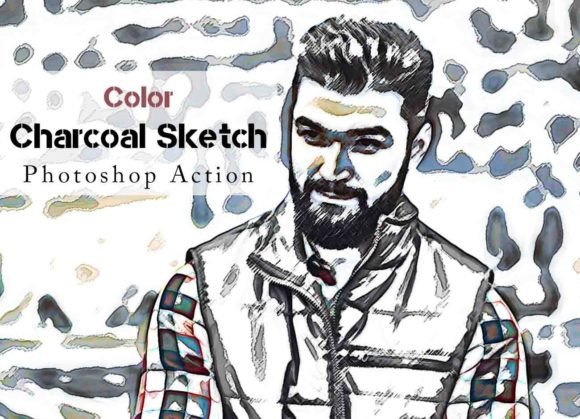
There's a certain magic in a charcoal sketch—the raw texture, the dramatic contrast, the sense that an artist's hand just touched the paper. Now, imagine bringing that timeless, expressive quality to your digital photographs with full, vibrant color. The Color Charcoal Sketch Photoshop Action is a specialized design asset that bridges the gap between traditional artistry and modern digital workflow. It's not just a filter; it's a transformative process that analyzes your image and rebuilds it with the nuanced strokes and grain of charcoal, all while preserving and enhancing the original color palette. The result is a stunning hybrid: a photograph that looks and feels like a hand-painted piece of art, full of depth and personality.
A Unique Visual Style for Modern Creators
The aesthetic of this action is immediately recognizable. It creates images with a rich, textured grain that mimics the tooth of charcoal paper. Highlights pop with a clean, almost paper-white brilliance, while shadows deepen with a velvety, granular density. The midtones are where the magic truly happens, with subtle variations in stroke that give portraits a soulful intensity and landscapes a dramatic, cinematic weight. Unlike a simple desaturation or sketch filter, this Color Charcoal Sketch Photoshop Action maintains color information, applying the charcoal effect in a way that allows hues to shine through the texture. A sunset retains its fiery oranges and pinks; a product shot keeps its brand colors but gains an artistic, hand-crafted feel. It’s a style that feels both premium and personal, perfect for anyone looking to create a brand identity that stands out from the polished, hyper-real crowd.
Practical Applications Across Projects
So, where does this distinctive style work best? The applications are broader than you might think. For social media graphics, it stops the scroll. A portrait transformed by this action has an inherent artistic quality that feels more gallery-worthy than a standard edit, making it ideal for artists, musicians, and lifestyle brands. In editorial design and publishing, it can add a layer of sophistication to feature images, author headshots, or chapter openers, lending a crafted, storybook quality. Logo design and packaging design can leverage this effect for hero images or background textures, creating a tactile, artisanal vibe that suggests quality and care. Even web design can benefit, using these stylized images for blog headers or about-page portraits to create a memorable first impression. The key is context; this is a creative font for imagery—a display treatment that commands attention and sets a specific, artistic tone.
Enhancing Readability and Visual Hierarchy
When we talk about readability and visual hierarchy in design, we usually think of typography. But the same principles apply to imagery. The Color Charcoal Sketch Photoshop Action excels at creating hierarchy by simplifying complex visual information into clear planes of light and dark. A busy background can become a soft, textured field, making the main subject—a person, a product—pop forward with greater clarity. The inherent contrast of the charcoal effect guides the viewer's eye naturally to the focal points. For brand perception, using this style consistently across a campaign or a series of images builds a recognizable visual language. It tells your audience you value artistry and craftsmanship, which can enhance perceived professionalism and foster deeper audience engagement. People connect with imagery that feels human and handmade, and this action delivers that connection digitally.
Using the Action Effectively in Your Workflow
Getting the most out of this tool is straightforward, thanks to its thoughtful design. The package includes the essential ATN file, a comprehensive Help File with a video guide, and ten customizable color options. Here’s how to integrate it seamlessly:
- Choose Your Photo Wisely. While it works on every photo, images with strong lighting and clear subjects yield the most dramatic results. A well-exposed portrait or a landscape with defined shapes will transform beautifully.
- Test and Customize. After running the action, don't stop there. The organized layers it creates are fully editable. Adjust the opacity of the charcoal layer, tweak the color overlay, or mask out areas where you want more photographic detail. This is where you move from using a preset to crafting a unique piece.
- Evaluate Font Pairings and Context. If you’re using this stylized image in a design with text, consider your typography carefully. The textured, organic feel pairs well with clean, modern typography—a simple sans serif font or a classic serif font can provide beautiful contrast. Avoid pairing it with overly ornate script fonts or handwritten fonts, as the styles might compete for attention.
- Check Commercial Licensing. The action is designed for broad compatibility, from Photoshop CS6 to CC2022, and is built for commercial use. Always ensure your project aligns with the license, especially for client work or products for sale.
In a digital landscape saturated with similar edits and filters, the Color Charcoal Sketch Photoshop Action offers a genuinely distinctive and versatile tool. It’s more than a one-click effect; it’s a foundation for building a richer, more textured visual narrative for your brand, your art, or your personal projects. By combining the emotional weight of traditional art with the convenience of digital editing, it empowers creators to produce images that are not just seen, but felt.